Ten terminal tabs? Try one cozy office.
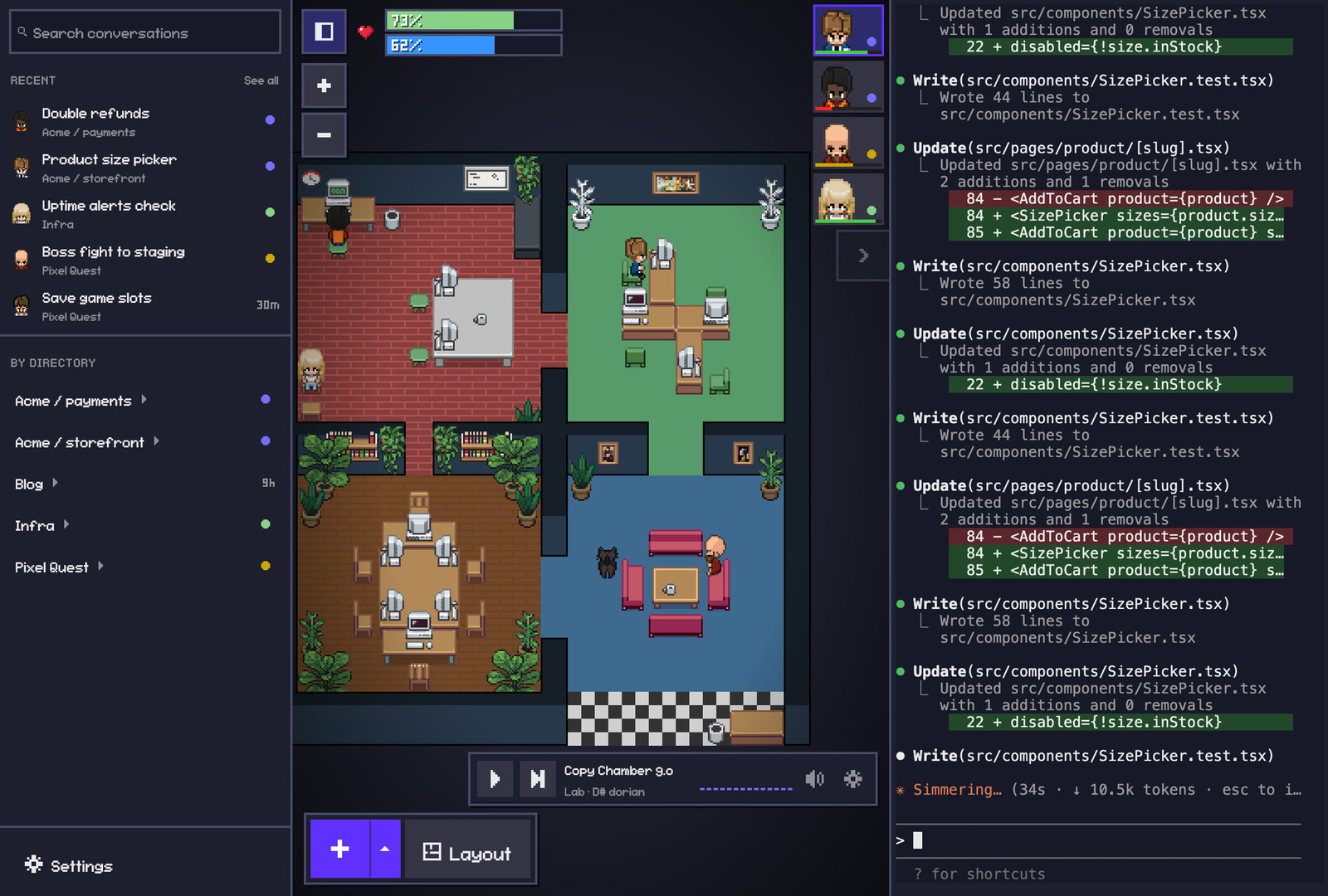
Pixel Agents turns every agent session into a character at a desk. Who’s working, who’s done and who’s waiting on you is clear at a glance.
Claude Code ~/code/storefront
> add a size picker to the product page
Read(src/product/Page.tsx)
⎿ Read 142 lines
Build your team
Give every agent its own look. Choose hair, clothes and colours, or go pixel by pixel.
Design your office
Paint floors and walls, place furniture and give each project its own room.
In your browser, on your phone or in your code editor
FreeMIT licensedRuns on your computerUses no tokensNo telemetrySource on GitHub
Install it in a minute
Run it
Run
npx pixel-agentsin a terminal. You need Node.js 20 or newer and Claude Code.Open it
Open the link it prints in your browser.
Start an agent
Press + and choose a project folder. The agent gets a desk and a terminal.
Using VS Code? Install it from the VS Code Marketplace or Open VSX.
Frequently Asked Questions
How much does Pixel Agents cost?
Nothing. Pixel Agents is free and open source under the MIT License. It uses no tokens and collects no telemetry. Source on GitHub.
Does Pixel Agents send anything outside my network?
No. The office runs on your computer and only reads your own agents. To use it on your phone, you connect over your own network or a private network you set up, like Tailscale, with a private link.
Which agents does Pixel Agents support?
For now, only Claude Code; however, the project is built on a modular architecture, so adding a new agent is easy: point your coding agent at the Pixel Agents codebase and ask it to build the integration. Interested in building on top of Pixel Agents? Join our Discord.
Does Pixel Agents change my Claude Code settings?
Only if you agree. To update the office instantly, it can add hooks to Claude Code's settings. It shows you what it will add and asks first, and turning hooks off removes them. Without hooks, it reads the session transcripts instead.
What do I need to run Pixel Agents?
Claude Code, and either Node.js 20 or newer for npx pixel-agents, or VS Code 1.105 or newer (or a fork like Cursor). It runs on macOS, Windows and Linux.
Can I use my own art in Pixel Agents?
Yes. Make characters in the character creator, build your office in the layout editor, or load your own sprite sheets from a folder.
Try Pixel Agents
Run one command, open the link, and have some fun while you work.